Send Text Messages by API
Overview / How it Works
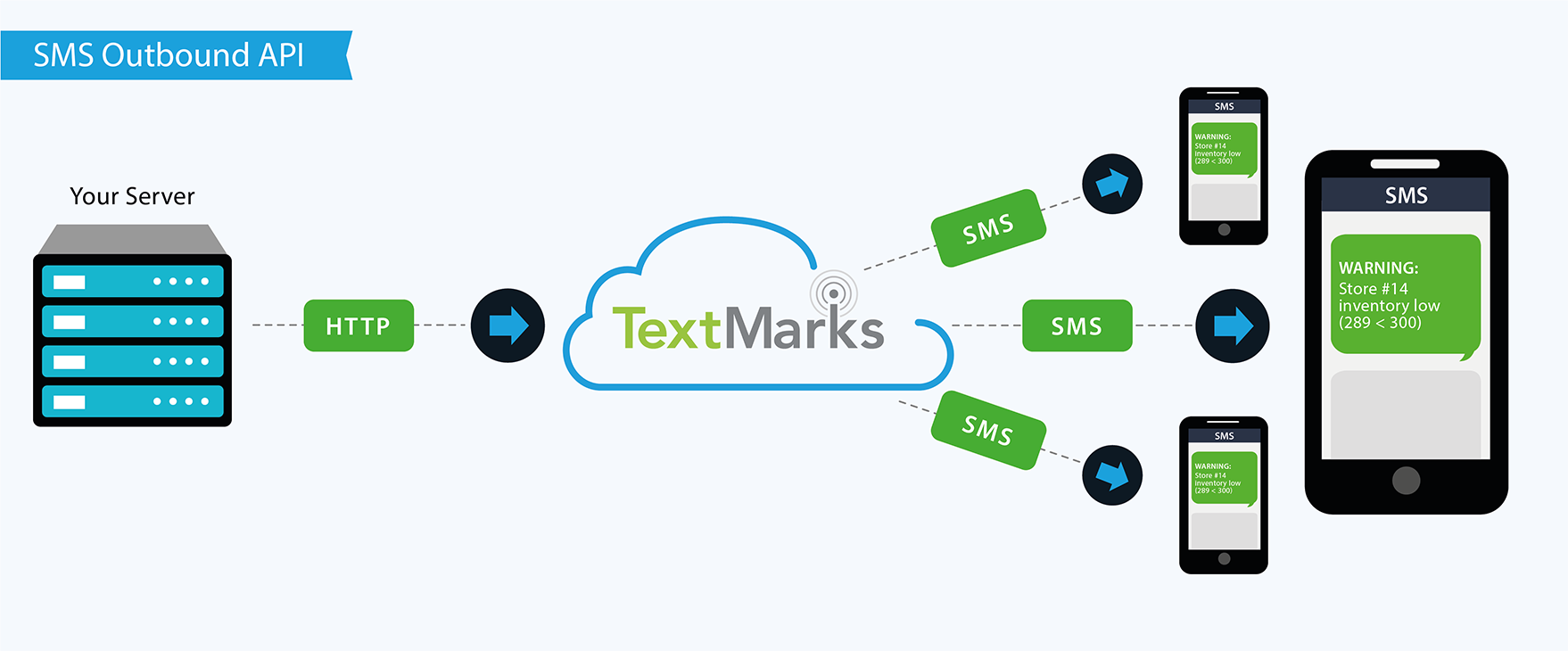
- Your server makes an HTTP request to a TextMarks API server.
- TextMarks sends your text messages to all members of your group or to individuals specified.
Getting Started
If you don't have an account yet, you can contact Sales here.
TextMarks provides access to SMS short code (like 81411).
Mobile phones can send to and receive text messages from short codes just like regular
7 or 10 digit phone numbers, but short codes are easier to remember and use.
All of your messaging must take place in the context of a keyword "group".
To identify your group on a specific short code,
register a keyword for your users to use when texting (e.g. to81411).
Your keyword is a bit like a domain name and should be short and meaningful.
Some examples: JMCYOUTH, DALIS, KERNSON4TH, MRJONESP4...
(You would tell people to "Text JMCYOUTH to 81411 to join our group")
To register your group keyword, make sure you're logged in to www.TextMarks.com. Then go to your dashboard and click on the "Make New Group" button, type in your keyword, and assuming it's available, it's yours!
Next go to the Subscription Settings panel for your keyword:
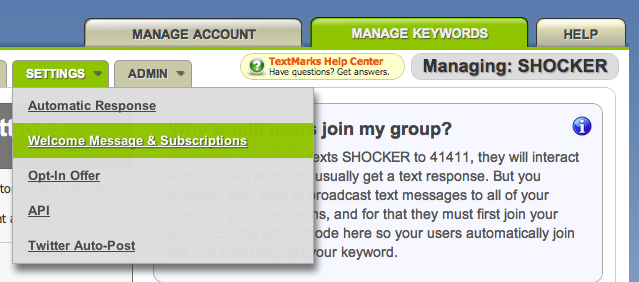
Make sure "automatic" subscription is enabled so that anybody who
texts your keyword (e.g. to 81411) will be subscribed your group.
You can also optionally set a welcome message on this page that new group members will receive.
Try it yourself from your phone.
STOP".
You can also unsubscribe from a specific keyword by replying with "UNSUB KEYWORD".
Building your Subscriber List
Unlike simpler text message gateways, TextMarks offers fully carrier compliant group management features that allow you to focus on your application itself instead of worrying about complex regulations and building your own opt-in and opt-out pathways. And because TextMarks takes SPAM seriously, you and your users can feel comfortable using your SMS service without worrying about numbers being sold or misused. Once your users join your keyword group, you're free to message any or all of them any time you want, safely and securely.
The best ways to add your users as potential text recipients:
- Tell users to "Text
KEYWORDto81411". - Users can subscribe from your own site via one of our customizable HTML widgets.
- From your own website or app, invoke our Anybody.invite_to_group API call.
- See other options in the "Promotion Tools" menu for your keyword.
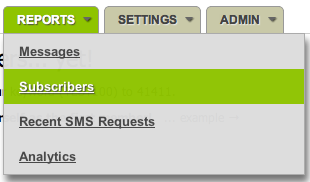
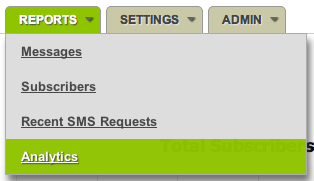
You may view and manage your current subscribers and see historical graphs of subscriber growth in the Reports menu for your keyword under "Subscribers" and "Analytics" respectively:
Relevant API Functions
Using the TextMarks SMS API, you can easily send text messages to a single member of your group or all members of your group. The API package GroupLeader contains both of the methods you might be interested in:
- GroupLeader.broadcast_message - to send the same text message to all members of your keyword group.
- GroupLeader.send_one_message - to send a single text message to one member of your keyword group.
In the next section we'll cover how to actually invoke these API functions.
Install a Client Library
Client libraries for the TextMarks API are available in many popular languages below. Because the protocol is based on simple HTTP interactions, you should be able to easily write your own integration in any other language as well. Feel free to contact developer support with questions.
PHP
Additional Resources
Python
Download Python 3 Client Library
Dependencies
- requests (pip install requests)
Older Libraries:
.NET
To use this .NET API client, you may extract the ZIP file and then choose any of these approaches:
- You may copy the pre-built .DLLs from the TextMarksV2APIClient-DotNet/bin/Release/ directory into your own project.
- You may use the API client source directly in your project.
- You may build the DLLs yourself and include these in your own project.
Error Handling
All TextMarks API function calls return a numeric result code ("rescode"), with 0 (zero) indicating success. Any non-zero (error) condition is typically accompanied by a result message ("resmsg"). Each client library will handle these errors differently, for example by raising/throwing exceptions. Some client libraries further differentiate between transport exceptions (such as due to network connectivity issues) and result exceptions (such as due to invalid parameters specified).
For information about which specific error cases you should check for, see the API function reference for each specific function you are calling. The full list of error codes is available here:
Which TextMarks SMS API Is Right For Me?
Features |
SMS Auto Responders |
SMS Sending API |
Advanced Deep Integration |
Capture text messages sent by users |
Yes |
No |
No |
Send individual text messages to users |
Yes |
Yes |
Yes |
Send mass text messages to users |
No |
Yes |
Yes |
Compliance |
SMS Auto Responders |
SMS Sending API |
Advanced Deep Integration |
Fully carrier and TCPA compliant |
Yes |
Yes |
Yes |
Phone# list uploads allowed |
N/A |
No |
No |
Pricing |
SMS Auto Responders |
SMS Sending API |
Advanced Deep Integration |
Free version? |
Sorry, we offer a paid service only |
Sorry, we offer a paid service only |
Sorry, we offer a paid service only |
Billing |
Easy automatic monthly credit card billing |
Easy automatic monthly credit card billing |
Easy automatic monthly credit card billing |
Price |
|||
End users pay? |
Msg & data rates may apply, but service is otherwise free to end users |
Msg & data rates may apply, but service is otherwise free to end users |
Msg & data rates may apply, but service is otherwise free to end users |
Integration |
SMS Auto Responders |
SMS Sending API |
Advanced Deep Integration |
Technical Challenge |
Easy |
Medium |
Hard |
Can Be Used Without API Key |
Yes |
Yes |
No |
Works with other TextMarks services |
Yes |
Yes |
Yes |
Easy web-based admin UI and reporting |
Yes |
Yes |
Yes |
Can be used without client library? |
Yes |
No |
No |
Client libraries available |
|||
More Info |
SMS Auto Responders |
SMS Sending API |
Advanced Deep Integration |
All Major U.S. Carriers Supported |
Yes |
Yes |
Yes |
International Support (Non-U.S.) |
No |
No |
No |
High volume support |
Yes |
Yes |
Yes |
Rapid rate support |
Yes |
Yes |
Yes |
99.9% uptime guarantee |
Yes |
Yes |
Yes |
Have questions? Ready to start?
Sign up today for a free trial and experience the power and simplicity of the best text message API you'll find.
Want us to set up a demo for you? Call us at:
Questions? Feedback? Call us! (800) 696-1393
Service available on the following wireless networks: Verizon Wireless, AT&T, T-Mobile, Metro PCS, Sprint, Boost, Virgin Mobile USA, U.S. Cellular. TextMarks works only in the U.S. TextMarks does not sell personal information. Copyright © 2015 TextMarks Inc. All rights reserved. v3.53.1 (6906) [16.146]