TextMarks Text Message API
The easiest to use, most reliable SMS API available.
SMS Auto Responder API
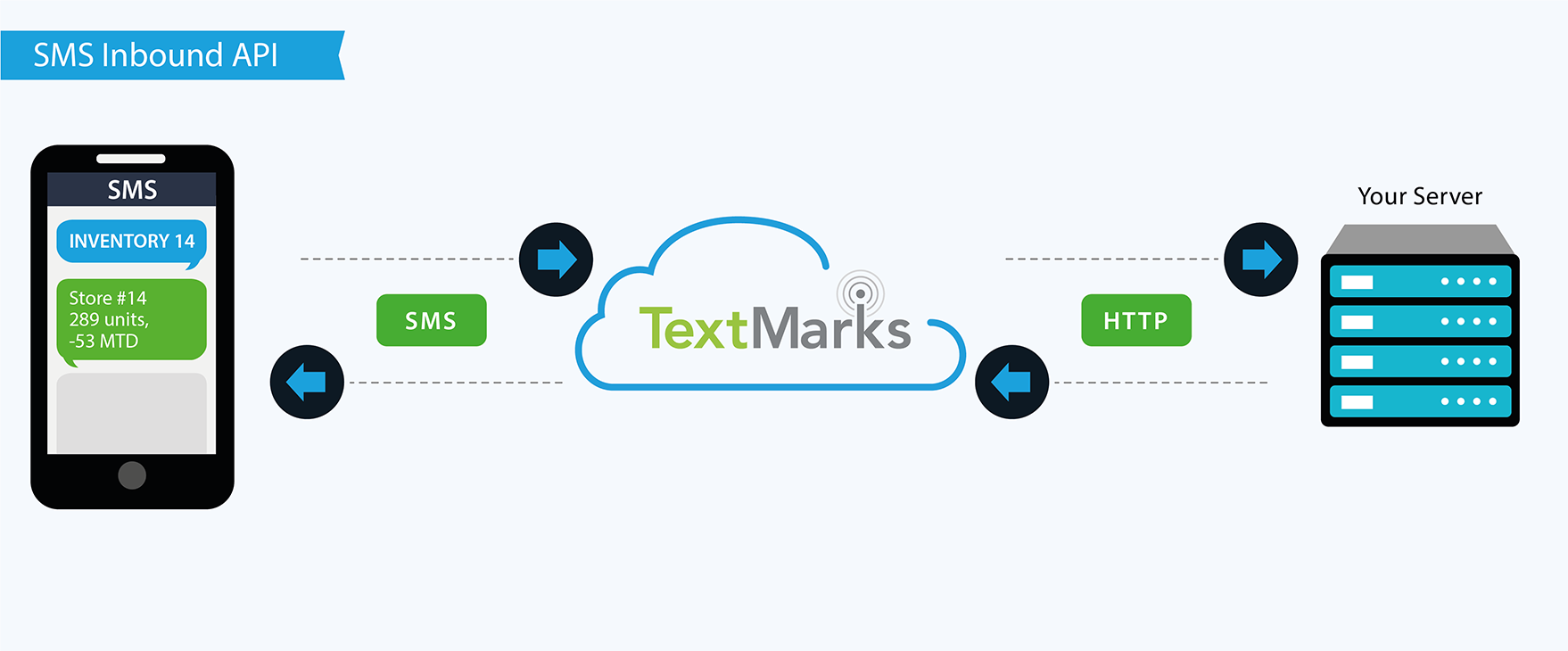
Text Message Request/Response
Provide on-demand access to information via text message with your own “SMS Auto-Responder”.
Users send a text message beginning with your keyword to a phone number or
SMS short code (like 72345),
our servers HTTP request to your servers (a "callback" or "web hook"),
your scripts look up the info requested and respond,
and we instantly forward that to the user as another text message.
SMS Sending API
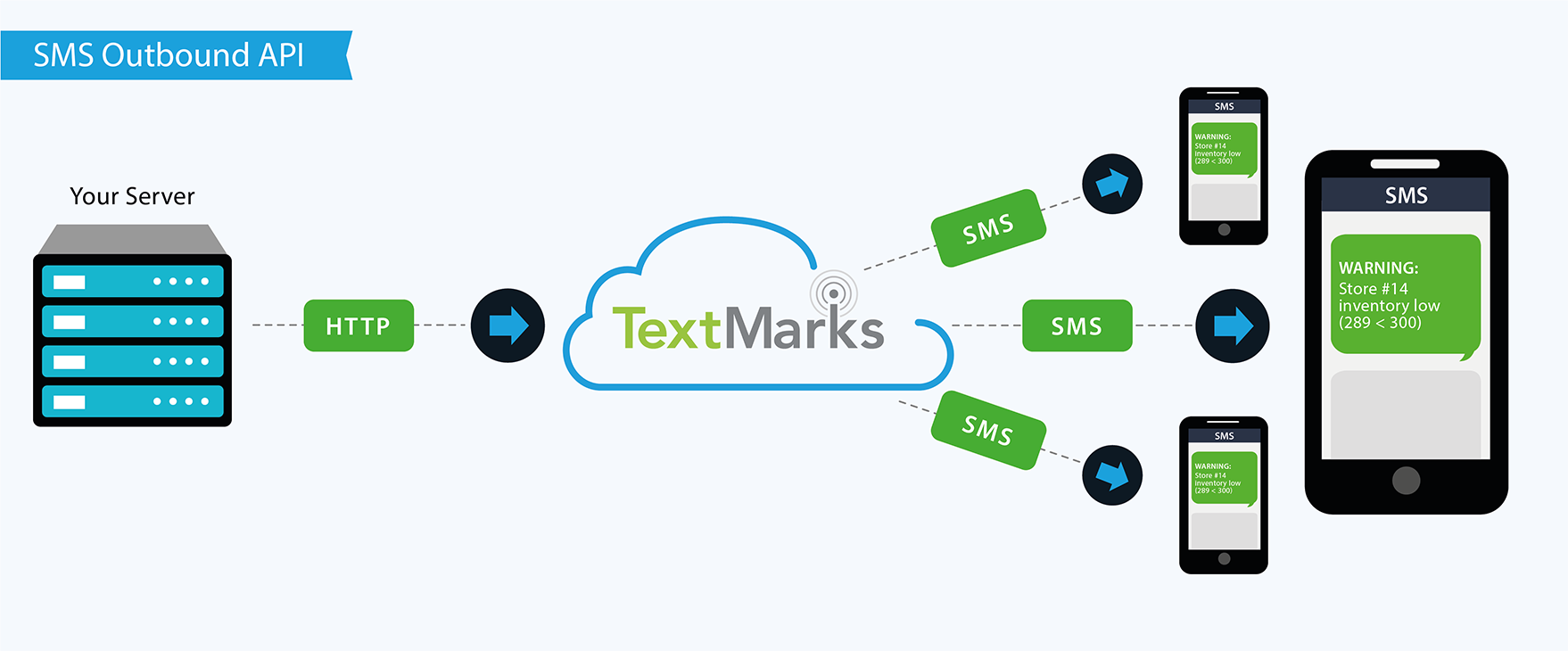
Send Text Messages by API
Notify your users by text message. Make an HTTP request to our API server and we handle the rest, with near instant delivery.
Send to individuals or groups. Users can join your list by texting your keyword to a unique SMS short code (like 81411). We handle carrier compliance and group membership so you can focus on your application and business.
Advanced API
Advanced API Integrations
The “Send Text Messages by API” above is part of our larger API, ready for you to access more data, manage keywords, statistics, group membership, and more -- enough to build your own white label version of the TextMarks service!
Our API is built on modern lightweight web standards like basic HTTP and JSON. Our documentation and tools let you discover what's possible and make calls in your browser without writing a single line of code. Our protocols are open and easy to implement, and we offer production-ready client libraries for Python, PHP, Java, and .NET.
Did you know...
Did you know that our entire website is built on top of our own API?
That's how powerful and reliable it is.
If our API is down, we're down.
More Information
- Contact Sales
- Text Message Request/Response (“SMS Auto-Responder”)
- Send Text Messages by API
- Download Client Libraries / SDKs
- API Error / Result Code reference
- API Function reference
- Terms of Use
- Support / FAQ / Help
- Reach a TextMarks engineer any time through our special API hotline: 415-326-4801
Which TextMarks SMS API Is Right For Me?
Features |
SMS Auto Responders |
SMS Sending API |
Advanced Deep Integration |
Capture text messages sent by users |
Yes |
No |
No |
Send individual text messages to users |
Yes |
Yes |
Yes |
Send mass text messages to users |
No |
Yes |
Yes |
Compliance |
SMS Auto Responders |
SMS Sending API |
Advanced Deep Integration |
Fully carrier and TCPA compliant |
Yes |
Yes |
Yes |
Phone# list uploads allowed |
N/A |
No |
No |
Pricing |
SMS Auto Responders |
SMS Sending API |
Advanced Deep Integration |
Free version? |
Sorry, we offer a paid service only |
Sorry, we offer a paid service only |
Sorry, we offer a paid service only |
Billing |
Easy automatic monthly credit card billing |
Easy automatic monthly credit card billing |
Easy automatic monthly credit card billing |
Price |
|||
End users pay? |
Msg & data rates may apply, but service is otherwise free to end users |
Msg & data rates may apply, but service is otherwise free to end users |
Msg & data rates may apply, but service is otherwise free to end users |
Integration |
SMS Auto Responders |
SMS Sending API |
Advanced Deep Integration |
Technical Challenge |
Easy |
Medium |
Hard |
Can Be Used Without API Key |
Yes |
Yes |
No |
Works with other TextMarks services |
Yes |
Yes |
Yes |
Easy web-based admin UI and reporting |
Yes |
Yes |
Yes |
Can be used without client library? |
Yes |
No |
No |
Client libraries available |
|||
More Info |
SMS Auto Responders |
SMS Sending API |
Advanced Deep Integration |
All Major U.S. Carriers Supported |
Yes |
Yes |
Yes |
International Support (Non-U.S.) |
No |
No |
No |
High volume support |
Yes |
Yes |
Yes |
Rapid rate support |
Yes |
Yes |
Yes |
99.9% uptime guarantee |
Yes |
Yes |
Yes |
Have questions? Ready to start?
Sign up today for a free trial and experience the power and simplicity of the best text message API you'll find.
Want us to set up a demo for you? Call us at:
Questions? Feedback? Call us! (800) 696-1393
Service available on the following wireless networks: Verizon Wireless, AT&T, T-Mobile, Metro PCS, Sprint, Boost, Virgin Mobile USA, U.S. Cellular. TextMarks works only in the U.S. TextMarks does not sell personal information. Copyright © 2015 TextMarks Inc. All rights reserved. v3.53.2-swift (6906) [16.146]